Microsoft Copilot at Swissmem: Making an AI Rollout for 120 Employees Measurable
Digital Airways·
Swissmem is the voice of 1,500 Swiss industrial companies. When an association of that standing introduces Microsoft Copilot for around 120 employees, it cannot be a box-ticking training exercise. The investment has to pay off demonstrably. That is exactly how we set up the project, and in this article we show you how.
What is Microsoft Copilot?
Microsoft Copilot is the AI assistant for Microsoft 365. It works directly inside the applications your employees already use every day, Word, Excel, PowerPoint, Outlook and Teams. The decisive point, Copilot works with the data in your own Microsoft 365 environment, your documents, e-mails and meetings, and it respects your existing access permissions. Through Copilot, employees only see what they are allowed to see anyway. According to Microsoft, company content and prompts are not used to train the underlying AI models.
What value does Copilot bring to your organisation?
The value comes from the recurring tasks that eat up time in every company. A few examples.
- Meetings. Copilot summarises Teams meetings and captures action items, including for people who could not attend.
- Documents and e-mails. First drafts of reports, concepts and replies take minutes instead of hours and are then refined by a person.
- Analysis. Copilot analyses Excel data on request, without anyone having to master formulas.
- Finding knowledge. Instead of digging through folders, employees ask Copilot and get answers drawn from their own company documents.
The honest flip side, this value does not come from switching on licences. A Copilot licence costs money per person per month, and the return only materialises once that person uses the tool effectively in their own work. That is why the rollout itself decides whether the investment pays off. Whoever merely distributes licences and shows a standard webinar pays for a tool that hardly anyone uses.
How a Copilot rollout makes the value visible
At Swissmem we structured the rollout so that the benefit is measured, not merely claimed. Four steps.
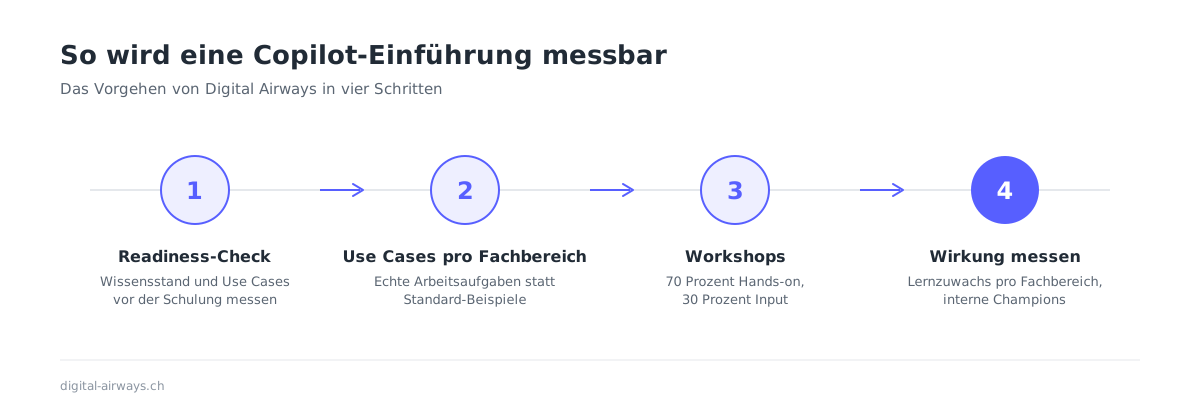
Step 1. A readiness check before the first training session
Before a single minute of training took place at Swissmem, we measured where the organisation stood. Level of knowledge, prior experience with AI tools and existing use cases per department. For this we built a dedicated learning platform through which employees complete the check.
The result is an honest baseline instead of an assumption. And it is the foundation for measuring success later on.
Step 2. Use cases from each department instead of standard examples
A Copilot example from marketing does not help the finance team much. That is why we work with department-specific use cases. Every department gets to know Copilot through the tasks it handles every day.
Step 3. Workshops with 70 percent hands-on
Our workshops follow the formula of 70 percent hands-on, 30 percent input. Employees spend most of the time working with Copilot on their own examples rather than looking at slides. That builds ability, not just knowledge.
Step 4. Measuring success and building internal champions
After a practice phase, the check is repeated. Comparing it with the baseline shows in black and white how large the learning gain is, per department. The organisation sees not only that training took place, but what the training achieved, documented as a training record. To close the project, the departments present their results to each other. That creates internal champions who carry the topic forward long after the project ends.
Why go to this effort?
Because an AI rollout is an investment and has to pay off demonstrably. Without measuring before and after, every statement about the benefit remains a claim. With measurement, it becomes a result.
Our work with Swissmem takes place within our partnership with the Next Industries initiative.
Frequently asked questions about Copilot rollouts
How long does a Copilot rollout take? That depends on the size of the organisation and the number of departments. The approach stays the same, readiness check, department-specific workshops, practice phase, second measurement.
Is technical preparation needed before the training? Yes. Copilot works with the data in your Microsoft 365 environment. Permissions and data storage should be reviewed before the rollout. More on our Microsoft 365 page.
Who is Copilot worth it for? For organisations that work with Microsoft 365 every day and have recurring writing, analysis and research tasks. Where you should start in concrete terms is something we are happy to clarify in a conversation.
Planning a Copilot rollout and expecting more than a box-ticking training? Find out how we introduce Copilot or book a no-obligation initial consultation.